

Critical updates
Please review the following critical hardware, software, and commissioning updates before starting an Enphase Energy System installation.
The IQ Battery 5P may ship with one of two cover variants: Variant A (two conduit entry points) or Variant B (one conduit entry point). While both variants meet all functional and safety requirements, Variant B requires special attention during installation. Since it provides only a single conduit opening, installers must route both power and control communication cables through the same conduit.
For outdoor installations, ensure proper ingress protection when using one conduit for both cables. Use flexible conduits with sealing hubs rated for outdoor applications. Cable glands are not suitable for outdoor use. This variation does not affect product performance, but correct routing is essential for compliance and reliability.
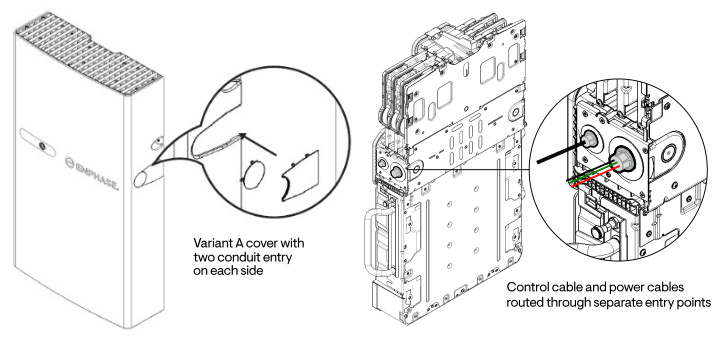
Variant A - Two conduit entry points
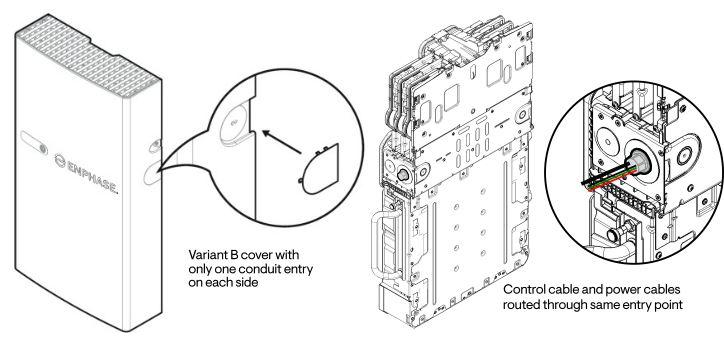
Variant B - One conduit entry point
Proper installation and commissioning are essential to ensure reliable operation of Enphase FlexPhase battery systems.
This guide highlights key steps and recommendations for installers— including pre-installation checks, wiring setup, configuration in the Enphase Installer App, and on-site troubleshooting guidance. Identify and resolve potential issues quickly and ensure a smoother and more efficient commissioning process.
Download the Best practices guide.
By installing new, higher-wattage panels with IQ8 Microinverters, installers can unlock the full potential of sites where IQ7 Microinverters have already been installed.
Supported system configurations include Solar Only and Solar Plus Batteries without backup; supported batteries include the IQ Battery 5P.
Watch this training video for more information.
Further details:
An additional IQ Gateway is not required when expanding an IQ7 Microinverter site with IQ8 Microinverters. An automatic software upgrade during commissioning of the newly added IQ8 Microinverters will ensure compatibility with the existing IQ7 Microinverters present at the site.
Commissioning of the new IQ8 Microinverters requires the latest Enphase Installer App and IQ Gateway software version.
Download the latest user manual explaining the wiring scheme, to ensure the smooth operation of all the devices in the system and to follow the local wiring regulations. The following instructions apply specifically to the installation and wiring of new IQ System Controllers. Existing commissioned and operational Enphase Energy Systems do not require any wiring modifications.
Download the newest troubleshooting guide to resolve issues with the IQ Battery 5P, IQ System Controller 3/3G, and Communications Kit 2.
Refer to the IQ System Controller 3 INT quick install guide (page 25) for details on all the applicable communication cables.
Enphase IQ Batteries help keep power flowing even when the weather turns on you or the grid has a bad day. Learn how to get the most out of your IQ Battery during a grid outage.
This brief provides further detail about supported system configurations, as well the technical information required to evaluate sites and plan the installation of Enphase Energy Systems in Australia and New Zealand.
While installing the IQ System Controller 3 INT, use the gateway replacement feature in the Enphase Installer Portal or Enphase Installer App to move the microinverters from the existing gateway to the IQ Gateway embedded in the IQ System Controller 3 INT.
Once this is done, power down and remove the legacy gateway from the site before commissioning the system via the Enphase Installer App. This is a must to avoid conflicts between the legacy gateway and the IQ System Controller 3 INT.
To learn more about gateway replacement, refer to the tech brief.
Before turning on the IQ System Controller 3 INT:
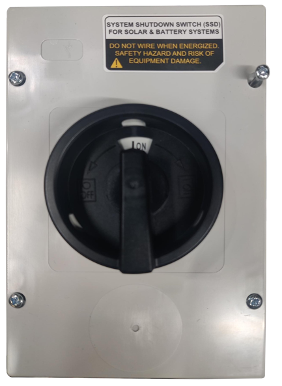
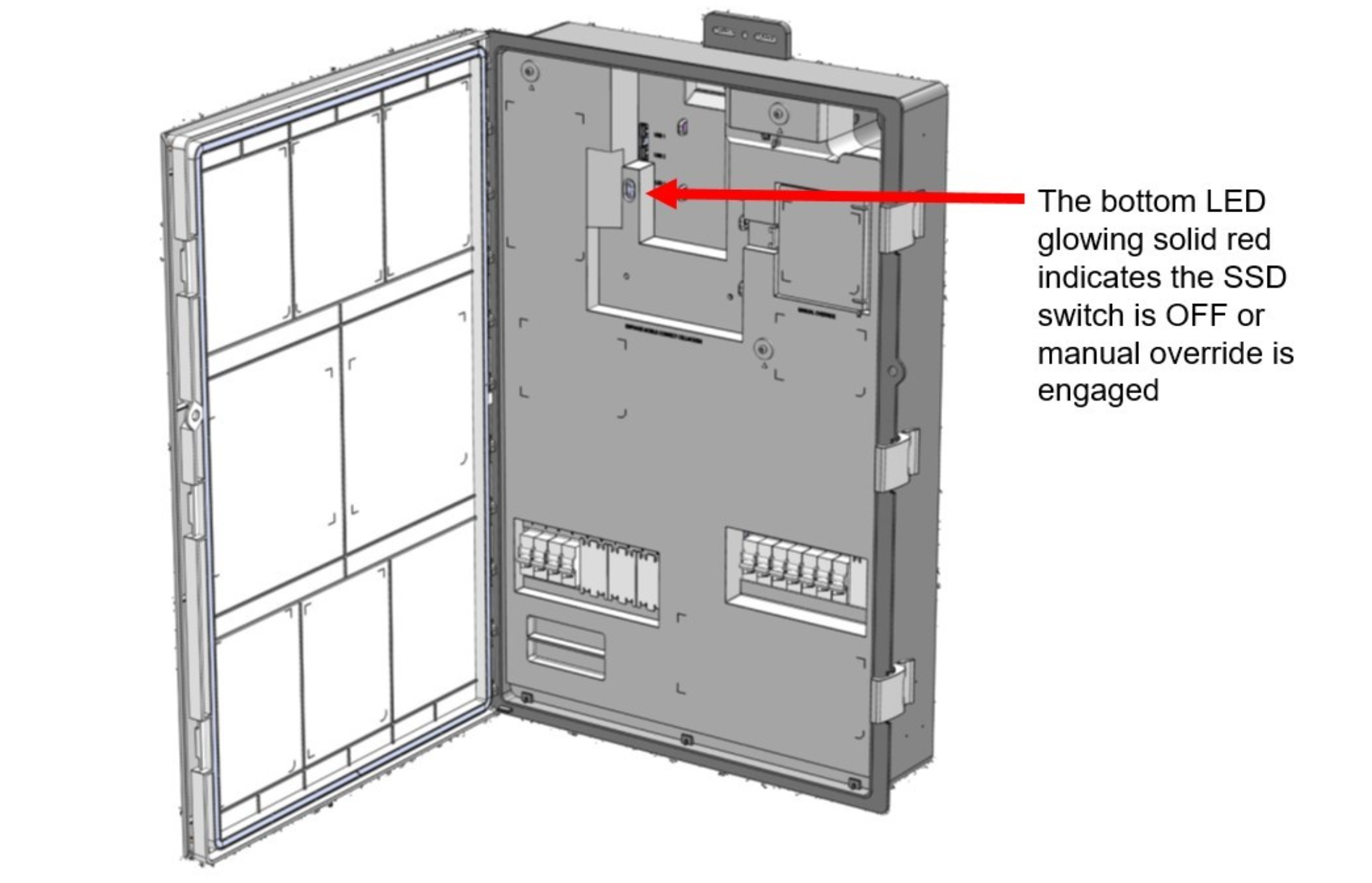
For further information or clarification, refer to the IQ System Controller 3 INT quick install guide.
Data sheets, installation guides, wiring diagrams and OND files can be found in the Enphase Documentation Centre https://enphase.com/en-au/installers/resources/documentation
Select Microinverters and filter by product to find the information for the IQ8 Family.
Data sheets and installation guides can be found in the Enphase Documentation Centre https://enphase.com/en-au/installers/resources/documentation
Select Storage and filter by products to find the information on the IQ battery 5P and IQ System Controller 3 INT.
With the updated Enphase Installer Portal, you can send a site-access email to your customers in a few simple steps. This will help you reduce the time it takes to get your customers up, running, and enjoying their new Enphase Energy System. Learn how to resend Enphase access to a customer using the Installer Portal and the Installer App.
Download the new Solar Troubleshooting Guide to resolve common IQ Gateway and consumption monitoring issues, including power line noise detection and resolution, IQ Gateway connectivity, CT configuration, and reverse polarity.
This release is available for in-progress Enphase Energy System installations using the latest version of the Enphase Installer App and as an over-the-air update for already installed systems. Read the full release notes for more information.
Learn more about the steps to complete a software update:
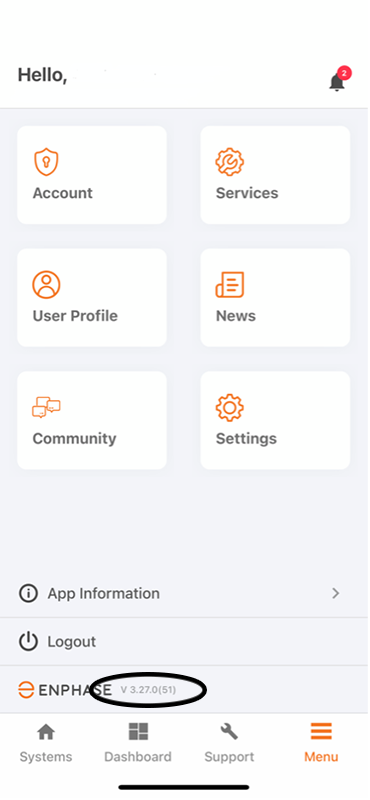
Before you leave for the install site, open the Enphase Installer App and confirm you are running version 3.27.0. If not, then download the latest update from the Apple App Store or Google Play Store.
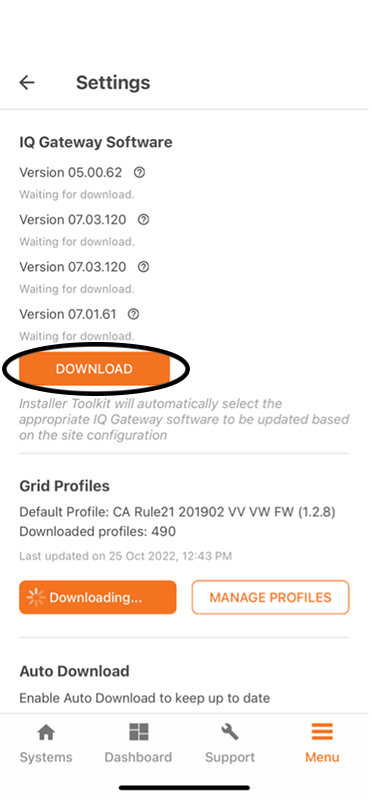
In the Installer App settings, check to see if the IQ Gateway has already automatically downloaded version 7.03.120. If not, tap ’Download’. We recommend performing this step in the office over Wi-Fi prior to going into the field.
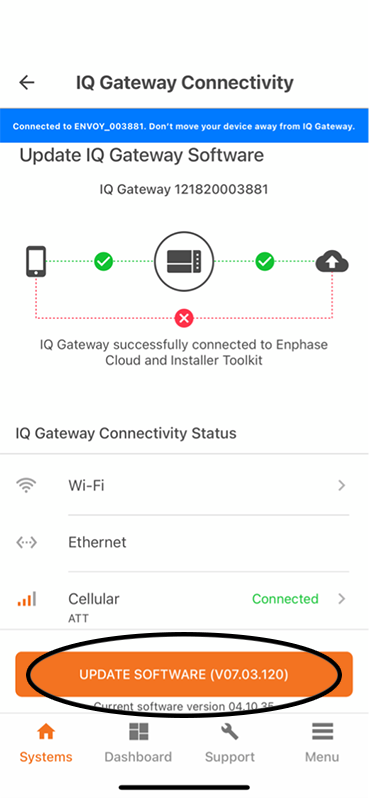
Once you arrive on-site, connect to the IQ Gateway and tap ’Update Software (v07.03.120)’.
Ensure proper grid profile propagation and the ability to disable power production in the IQ Gateway with two short steps:
Learn how to visually inspect a breaker prior to installation.
Reverse the polarity of the meters from the Enphase Installer Portal. This will enable you to flip the polarity remotely and ensure correct readings are observed.
Warning
There were previously products added in your cart. We have removed those products and added the BOM to your cart.
NOTE: IQ PowerPack 1500 supports maximum 400W solar input. Your cart has excess panels.

Installation address : , , ,
Installation address : Same as shipping address,
Warning
Installation services are available for a single installation site. If you'd like to get multiple EV chargers installed at different addresses, please complete a separate order for each address. To continue this order, please reduce the charger quantity or remove the install service from your cart.
Store sign in
Please enter your Enphase App credentials.
Back
Forgot your password?
Please enter your email address below to receive a password reset link.

